


The Fixed IP Input tool is used in VSRO development to modify the GatewayServer connection settings داخل media.pk2. This tool is essential for configuring how the client connects to your server.
From the interface shown, the tool allows you to define several important parameters:
The most important field here is the GatewayServer URL, which defines where the client connects. In the example, it is set to 1.1.1.1, but this should be replaced with your real VPS IP or domain.
The Port (55779) is also critical. If you are using a custom port instead of default settings, it must match your server configuration; otherwise, the client will fail to connect.
In conclusion, Fixed IP Input tool is one of the most important utilities for VSRO client configuration. It allows quick and safe modification of connection settings without manual hex editing.
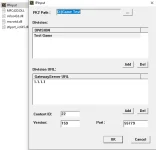
From the interface shown, the tool allows you to define several important parameters:
- PK2 Path: The location of your client files (media.pk2)
- Division: Server name shown in client
- GatewayServer URL: Your VPS or dedicated server IP
- Port: Gateway port (default or custom)
- Content ID & Version: Must match server configuration
The most important field here is the GatewayServer URL, which defines where the client connects. In the example, it is set to 1.1.1.1, but this should be replaced with your real VPS IP or domain.
The Port (55779) is also critical. If you are using a custom port instead of default settings, it must match your server configuration; otherwise, the client will fail to connect.
 How It Works
- Select your media.pk2 path
- Add or edit Division
- Set your GatewayServer IP
- Adjust Port & Version
- Save changes
 Important Notes
- Wrong IP = client cannot connect
- Version must match server files
- Port must be open in VPS firewall
- Always backup media.pk2 before editing
 Usage Areas
- Changing server IP (local → VPS)
- Fixing connection issues
- Setting custom gateway ports
- Multi-division client setup
In conclusion, Fixed IP Input tool is one of the most important utilities for VSRO client configuration. It allows quick and safe modification of connection settings without manual hex editing.
İçeriği görüntülemek için Giriş yapın veya Kayıt olun.
- Meta Title
- Vsro IP Input Guide – Edit Media.pk2 GatewayServer & Port
- Meta Description
- Fixed IP Input tool for VSRO allows editing GatewayServer IP, port, and version directly in media.pk2.


