


- Katılım
- 23 Eki 2022
- Mesajlar
- 9,555
- Çözümler
- 14
- Tepkime puanı
- 7,917
- Puanları
- 113
- Yaş
- 28
Slot Click Macros Mod (Fabric 1.21.11)
Slot Click Macros is a client-side Minecraft Fabric mod that allows players to record and replay inventory click sequences. The mod is designed to simplify repetitive container interactions such as chests, shops, crafting tables, and custom GUI inventories by saving click patterns and playing them back automatically.With configurable playback delays, hotkey support, and a built-in queue system, Slot Click Macros provides a flexible way to manage repetitive inventory actions. Users can create multiple macros, assign custom keybinds, edit saved recordings, and organize macros through the integrated configuration menu.
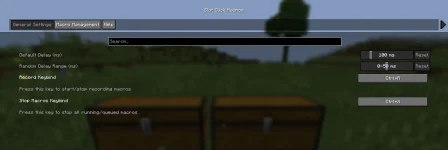
Features
- Record Inventory Click Sequences
- Replay Saved Inventory Macros
- Chest Automation Support
- Shop GUI Macro Support
- Crafting Table Macro
- Custom GUI Compatibility
- Configurable Playback Delays
- Randomized Delay Settings
- Queue-Based Macro Playback
- Hotkey Assignment
- Configuration GUI
- Create, Edit & Delete Macros
- Command Support
- Lightweight Client-Side Mod
- Fabric API Support
- Cloth Config Integration
- Minecraft 1.21.11 Compatible
- Java 21 Support
- Easy Installation
- Free Download
Commands
- /slotmacro play <name> – Play a saved macro
- /slotmacro stop – Stop the current macro
- /slotmacro list – View all saved macros
- /slotmacro delete <name> – Delete a saved macro
Installation
- Install Fabric Loader.
- Install Fabric API.
- Install Cloth Config.
- Copy the Slot Click Macros mod into your mods folder.
- Launch Minecraft and configure your macros.
İçeriği görüntülemek için Giriş yapın veya Kayıt olun.
