


Pk2ExtractorSE is one of the most useful tools for VSRO developers, especially when working with Silkroad Online graphic files. One of its standout features is the built-in DDJ viewer, which allows users to instantly preview images without needing external software.
DDJ files are a custom graphic format used by Silkroad Online to store textures, UI elements, and in-game visuals. Normally, these files are not directly viewable, but with Pk2ExtractorSE, the process becomes extremely simple and efficient.
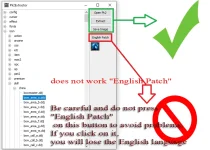
When you open a PK2 file using Pk2ExtractorSE and highlight any DDJ file, the tool automatically displays the image inside its interface. This real-time preview system saves a lot of time, especially when browsing through hundreds of texture files. Instead of extracting files one by one, you can instantly identify the correct asset.
Another powerful feature is the ability to export DDJ files. By using the "Save Image" option, users can convert and save these files as BMP format. This makes it easier to edit images using standard graphic software like Photoshop or other editors.
Key advantages of the built-in DDJ viewer:
This feature is especially important for developers working on:
In conclusion, Pk2ExtractorSE's built-in DDJ viewer significantly improves workflow efficiency. It simplifies both the preview and extraction process, making it an essential tool for anyone working with Silkroad graphics and PK2 files.
DDJ files are a custom graphic format used by Silkroad Online to store textures, UI elements, and in-game visuals. Normally, these files are not directly viewable, but with Pk2ExtractorSE, the process becomes extremely simple and efficient.
When you open a PK2 file using Pk2ExtractorSE and highlight any DDJ file, the tool automatically displays the image inside its interface. This real-time preview system saves a lot of time, especially when browsing through hundreds of texture files. Instead of extracting files one by one, you can instantly identify the correct asset.
Another powerful feature is the ability to export DDJ files. By using the "Save Image" option, users can convert and save these files as BMP format. This makes it easier to edit images using standard graphic software like Photoshop or other editors.
Key advantages of the built-in DDJ viewer:
- Instant preview of DDJ files
- No need for external converters
- Fast navigation through PK2 content
- Easy export to BMP format
- Ideal for UI and texture editing
This feature is especially important for developers working on:
- UI modifications
- Texture replacements
- Custom designs
- Silkroad private server development
In conclusion, Pk2ExtractorSE's built-in DDJ viewer significantly improves workflow efficiency. It simplifies both the preview and extraction process, making it an essential tool for anyone working with Silkroad graphics and PK2 files.
İçeriği görüntülemek için Giriş yapın veya Kayıt olun.
- Meta Title
- Vsro Pk2ExtractorSE Built-in DDJ Viewer Full Guide (Save as BMP)
- Meta Description
- Learn how to use Pk2ExtractorSE built-in DDJ viewer to preview Silkroad graphics and export DDJ files as BMP easily.

