


- Katılım
- 23 Eki 2022
- Mesajlar
- 9,675
- Çözümler
- 14
- Tepkime puanı
- 9,276
- Puanları
- 113
- Yaş
- 28
FS25 YieldTracker – Keep a Complete Record of Your Harvests
Want to know which fields give you the best harvest results in Farming Simulator 25? FS25 YieldTracker is a lightweight tracking mod that records your harvested crops and organizes the results by field, crop and farming year.The mod works quietly in the background while you play, allowing you to build a useful history of your farm's production without manually recording every harvest.
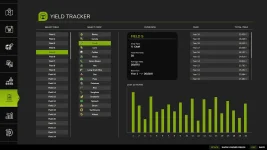
 Monitor Every Harvest
YieldTracker keeps track of the total amount harvested from individual fields and associates the results with the corresponding crop and year.This gives you a simple way to review your farming performance and compare production between different fields.
Key Features
- Records harvest quantities automatically
- Organizes data by field number
- Separates results by crop type
- Keeps track of harvest years
- Works while AI workers are active
- Records eligible contract harvests
- Useful for crop rotation planning
- Designed to work without interrupting gameplay
- Supports 19 different crop/fill types
 Supported Crops
The current version supports:Barley, Canola, Chaff, Corn, Cotton, Grass, Green Beans, Hay, Long Grain Rice, Oat, Peas, Potatoes, Rice, Sorghum, Soybeans, Spinach, Straw, Sunflowers and Wheat.
Grass, hay and straw tracking is available when using a baler.
 Plan Your Farm With Real Data
Instead of relying on estimates, YieldTracker allows you to build a historical overview of your actual harvests.You can use the collected information to identify productive fields, compare crops and make better decisions for future seasons. This can be especially useful for players who enjoy realistic and organized farm management.
 AI Workers & Contracts
The mod can continue recording harvest information when you use AI workers or perform supported contract jobs.This means you can let your workers handle harvesting without losing track of the production data generated during your farm operations.
 Installation
Installing the mod is straightforward:- Download the latest FS25 YieldTracker ZIP package.
- Place the ZIP file inside your Farming Simulator 25 mods folder.
- Start the game.
- Enable YieldTracker from the Mods menu.
Documents\My Games\FarmingSimulator2025\mods
 Compatibility
FS25 YieldTracker is currently designed for Singleplayer on PC/Mac.AI workers and supported contract harvesting are compatible with the mod. It is not currently intended for dedicated multiplayer gameplay.
 Who Should Use YieldTracker?
This mod is a great choice for players who enjoy:- Realistic farming
- Production statistics
- Crop rotation
- Long-term savegames
- Field management
- Harvest comparisons
- Detailed farm planning
İçeriği görüntülemek için Giriş yapın veya Kayıt olun.
